Create your Itzi key
Open the Itzi API dashboard and sign in. Under API keys, enter a name for this app and click Create. Copy the secret immediately: it is shown only once. Keep a separate key for each app and paste it only into its API key field.
Choose a model your account can access. Requests use your Itzi balance or subscription according to the key settings. The example keys in these screenshots do not work.
Open API dashboardConnection details
Custom Endpoint (Base URL)
https://itzi.app/v1Keep /v1. SillyTavern adds /chat/completions automatically.
- API key
- Your full Itzi key, starting with
itzi_sk_. - Model
- An exact model ID from your API dashboard or
/v1/models.
Set up the connection
Open API Connections
Click the plug icon in the top toolbar. Set API to Chat Completion, then set Chat Completion Source to Custom (OpenAI-compatible).
Enter the Itzi connection details
Paste the URL from Connection details into Custom Endpoint (Base URL). Paste your full Itzi key into Custom API Key (Optional). The key is required for Itzi, even though SillyTavern labels the field optional.
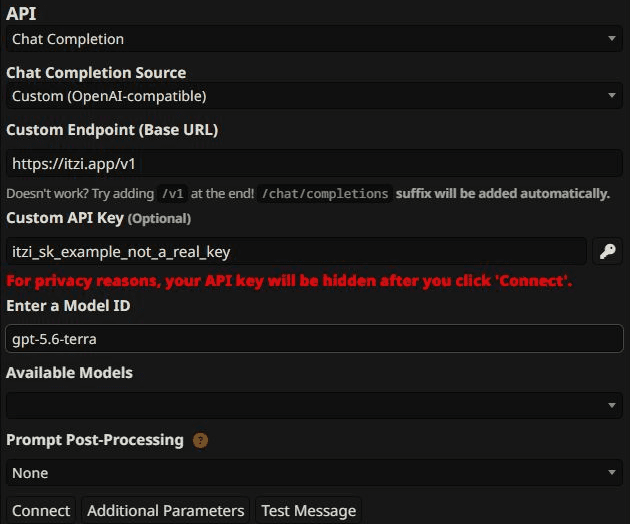
SillyTavern 1.18.0. Use your own key and an available model ID in place of these examples. Open the image to view it at full size. Connect and select a model
Click Connect. Choose an Itzi model from Available Models, or paste its exact ID into Enter a Model ID. The screenshot uses gpt-5.6-terra as an example; use a model available to your own key.
Send a test message
Click Test Message to check generation. This uses your Itzi balance or subscription allowance. Once it works, open your character chat. You can save a Connection Profile to reuse these settings.
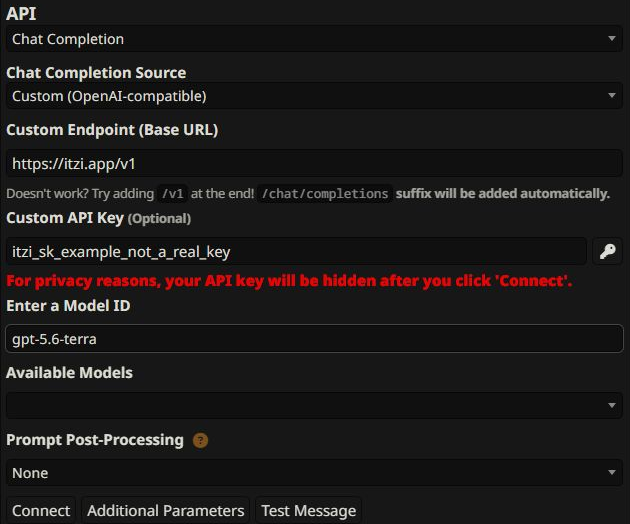
If something does not work
A URL that ends twice
If an error mentions /chat/completions/chat/completions, replace the endpoint with the base URL above. Do not use the full generation URL in this field.
Start with the default prompt processing
Leave Prompt Post-Processing at None for the first test. Change it only if the selected model requires a specific message format. Options marked no tools remove tool calls.
Invalid key or 401
Copy the entire Itzi key without spaces. If it was revoked or lost, create a replacement in the API dashboard. An upstream provider key cannot replace an Itzi key.
Payment or access error
Check your balance, subscription allowance and the API key's subscription settings. A model shown in the public catalog may require access your key does not have.
Model not found or an empty model list
Refresh the model list using your key. Copy the exact ID from the API dashboard, then confirm the endpoint and key were saved before model discovery.
Too many requests or 429
Wait before retrying and reduce parallel requests. Chat messages and background agents share your limits. Check the error message for a rate, concurrency or subscription limit.
Long chats fail or responses are empty
Test a short conversation first. Lower the client's context and output limits, including character, lorebook and system prompts in that budget. Check Itzi Status if a short request also fails.